Guide · Manufacturing & provisioning
How to provision MAC addresses and serial numbers for a device run
Registering a block, defining a serial number scheme, and generating your first batch, plus the scenarios that come up once real devices are moving: a partial shipment, an unused batch, a mistake caught early.
This walks through the batch provisioning tool end to end: registering a block you own, defining how serial numbers should look, and generating a batch that reserves both a MAC range and a serial range together. It's a Scale plan feature; everything below happens from your account once you're on it.
For the engineering background rather than the click path, see how to allocate MAC addresses during manufacturing, pool management across multiple factories, and generating serial numbers for manufactured products.
1. Register the block you control
Start on MAC blocks. Enter the OUI, MA-M, or MA-S block you own, in any of the usual forms (AA:BB:CC, AA-BB-CC, or bare AABBCC), and give it a label you'll recognize later, like a product line name. This step is self-declared: the tool never talks to IEEE on your behalf and never registers anything with them. It shows a non-blocking note if the block matches an organization in our own IEEE-synced database, but nothing is gated on that match. The practical risk of registering a block you don't actually control is bad data in your own account, not anything IEEE-facing.
Leave the start offset at 0 unless some addresses in the block are already committed outside this tool, addresses spent before you started using it, say. Setting it higher tells the tool to start counting from further in, so it never reuses those.
2. Define a serial number scheme
On Serial schemes, define the format your serial numbers should follow. A scheme is: an optional literal prefix (NR-, say), an optional date code (year + ISO week, like 2637, or a full date like 20260907), a zero-padded sequence of however many digits you need, and an optional trailing Luhn check digit for a cheap manual-entry error check. Define it once; every batch that should share the same format reuses the same scheme, and each one keeps its own independent, ever-advancing sequence.
3. Create a device portfolio
A portfolio is one device line under a block: pick which block it draws addresses from and a device category, once, and every batch generated under it inherits both. If you make more than one product from the same block, a Wi-Fi router and a separate access point, say, give each its own portfolio so their generated ranges and exports stay clearly separated even though they share a block.
4. Generate your first batch
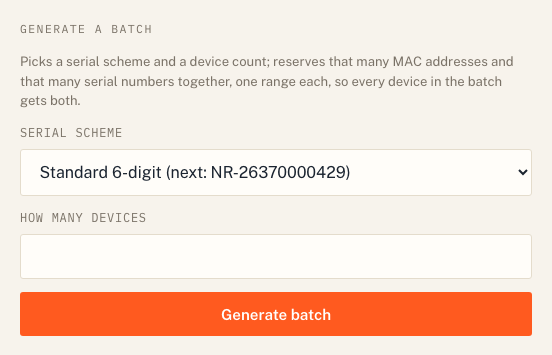
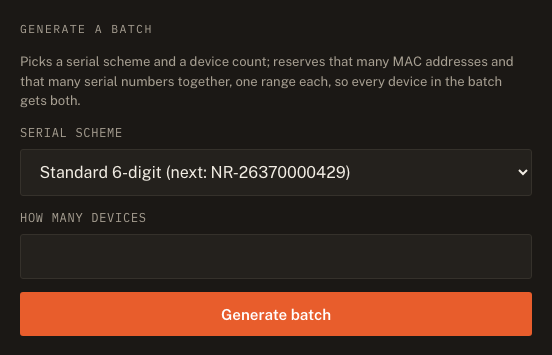
Open the portfolio, pick a serial scheme from the dropdown, and enter how many devices you need. Generating reserves a contiguous MAC range and a contiguous serial range together, in one atomic step, so two batches generated seconds apart can never collide, even under concurrent requests. Every device in the batch gets both a MAC address and a serial number; neither is ever generated on its own.
5. Export the batch as CSV
Export from the portfolio page at any time, in any status. A batch of up to 5,000 devices streams back immediately; above that, it compiles in the background and the page sends you to a status link that turns into a download once it's ready. Every row carries the MAC address, the serial number, the device category, the portfolio, the block label, and the batch's status, computed at export time from the batch's range rather than stored per device.
6. Update its status as reality changes
A freshly generated batch starts in the generated status. From there:
- Ship it once you've confirmed it's actually gone out. This is permanent: a shipped batch can never move back to released.
- Release it if it turns out the factory didn't use it. A released range becomes an explicit, opt-in starting point for a future batch, never silently reused. You can reactivate a released batch back to generated if you released it by mistake.
- Split it at any device count, down to a single device, before deciding. This is how you handle a batch that's only partly used: split it where the real shipment ended, then ship the first part and release the second.
Common scenarios
The factory only used part of the batch. Split it at the exact device count that actually shipped, then mark that part shipped and the remainder released. The released part becomes available as an explicit starting point next time, nothing is wasted, and nothing is silently reused either.
I released a batch by mistake. Reactivate it from the portfolio page. It goes back to generated, as if the release never happened, as long as it hasn't since been superseded by a new allocation drawing on the same range.
I generated a batch I don't need at all, and it's not shipped yet. Release it rather than trying to delete it. The tool is deliberately append-only: nothing is ever deleted, so every MAC address and serial number it ever handed out stays traceable, even one that turned out to be unused. Release gets you the same practical outcome, an unused batch is not consuming anything, without losing that record.
I'm downgrading off the Scale plan. Nothing is deleted or hidden. Every block, portfolio, batch, and export you already created stays exactly as it was, viewable and exportable regardless of plan. Only generating a new batch requires Scale.
Ready to start? See plans, or if you're already on Scale, jump straight to MAC blocks.
More guides